Workspace
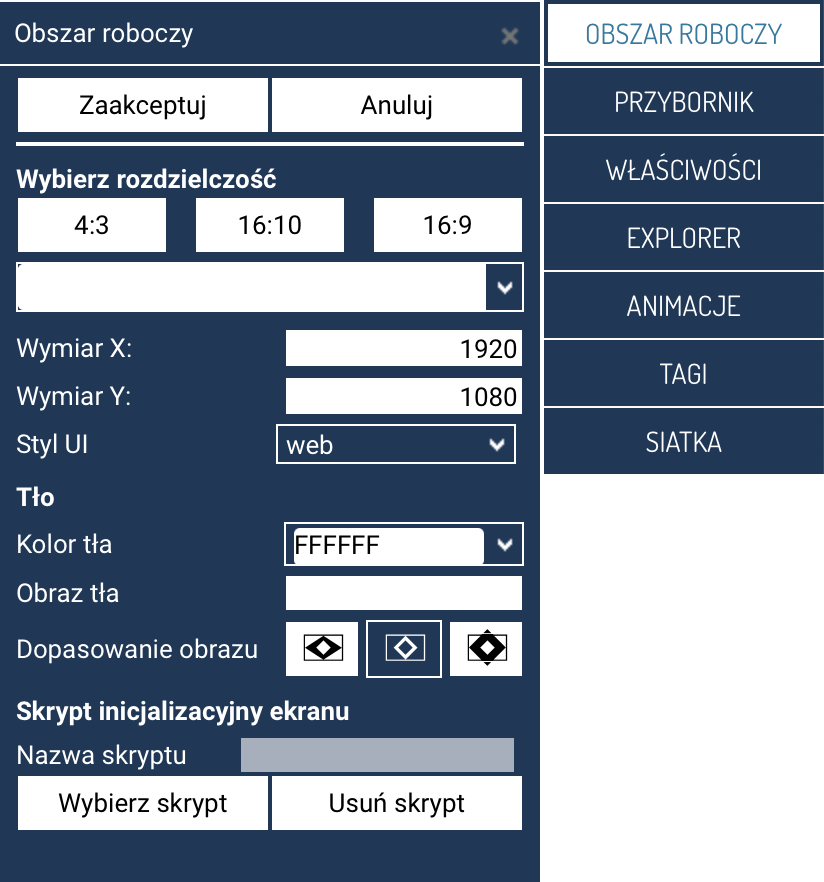
The Workspace panel is used to set the basic parameters of a SCADA screen before starting to design it. It lets you choose the resolution, set the background, the interface style, and select an initialization script.
Selecting the resolution
In this section, you define the proportions and dimensions of the screen being designed.
-
Ready-made proportions: – 4:3, 16:10, 16:9
-
Resolution selection list – a drop-down menu containing the most popular settings for the selected proportions.
-
Dimension X / Dimension Y – fields that let you manually specify the screen's width and height in pixels.
Working area size
The resolution set here determines the size of the working area in design mode.
UI style
The drop-down list lets you choose the interface styling, e.g. inventia dark. The style affects the appearance of some advanced object controls.
Background
In the Background section, you define the appearance of the SCADA screen's window:
- Background color – a solid color (HEX value).
- Background image – a graphic file used as the screen's background.
- Image fit:
- Fill – the image is stretched across the entire screen.
- Fit while keeping proportions – the entire image remains visible.
- Center – the image is placed centrally, without scaling.
Screen initialization script
A section that lets you link the screen to a script executed when it is launched.
- Script name – the currently linked script (if any).
- Select script – opens the script selection window.
- Remove script – detaches the linked script.
Initialization scripts can be responsible for preparing data, initializing variables, or display logic.
Action buttons
- Accept – saves the screen's properties.
- Cancel – closes the panel without making changes.